Last weekend I had two AI agents on my laptop: Goose for general work, and Kimchi for code, both are great. But I wanted both of them to use the same MCP server, and I caught myself in the act: I pasted the same server URL and the same API key into a second config file, in a second format, for the second time that day.
That was the moment for me, two agents in, and I already had config sprawl. What happens at five agents? At a team of ten people with five agents each? This post walks through the problem, by the end, Goose and Kimchi both talk to their tools through one front door, and you can see every call in one log.
The cast
Three open source projects. Here is what each one does in plain words.
| Project | What it is | Who made it | Role |
|---|---|---|---|
| Goose | An AI agent that runs on your machine; Desktop app and CLI. | Block, now under the Agentic AI Foundation | Agent number one |
| Kimchi | A terminal coding agent with multi-model orchestration | CAST AI | Agent number two |
| agentgateway | A proxy built for agent traffic, MCP tool calls and LLM calls | Solo.io, now a CNCF project | The front door |
One more term before we start. MCP, the Model Context Protocol, is the open standard that lets an agent call outside tools. Think of it as a USB port for agents, a tool server exposes tools and an agent plugs in to calls them.
The problem
Every agent ships with its own config system.
- Goose keeps extensions in
~/.config/goose/config.yaml - Kimchi keeps MCP servers in
~/.config/kimchi/sonichigo-harness/mcp.json - Claude Code, Cursor, and friends each keep their own files too
Each file holds the full list of MCP servers, plus any keys those servers need. So the same information lives in many places. That creates four real problems.
| Problem | Why it hurts? |
|---|---|
| Config sprawl | Two agents and three servers each means six connections. And each new agent copies the whole list again. |
| Key sprawl | API keys sit in plain text inside every agent config. More copies, more risk. |
| No shared audit trail | Since each agent logs its own calls, or logs nothing, therefor nobody can answer "which agent called which tool at late night?" |
| No shared control | You cannot rate limit or block a tool for all agents at once. You edit N files and hope it works. |
Here is the same picture as a diagram. The left side is where most of us are today.
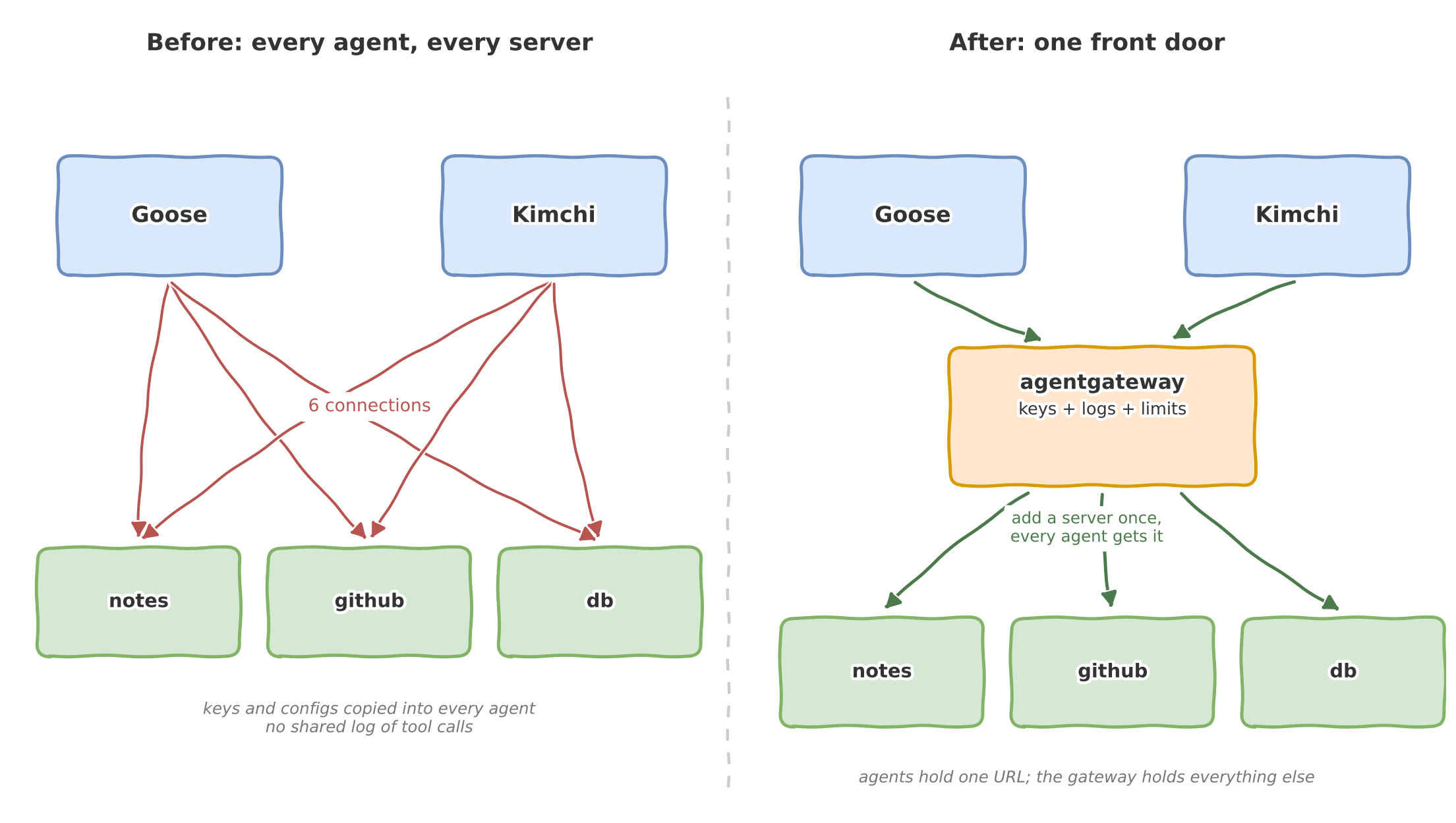
Count the red lines on the left. Six connections for two agents and three servers. Every line carries its own config and maybe its own key. Now look at the right side. Five green lines, and every one of them passes through a single point that holds the keys, the logs, and the limits.
That single point is "Agentgateway".
The fix is to have one front door
The idea is simple, and that is why it works, even web apps solved this years ago with API gateways. Agents need the same thing, but for MCP and LLM traffic. That is exactly what agentgateway does.
![Architecture]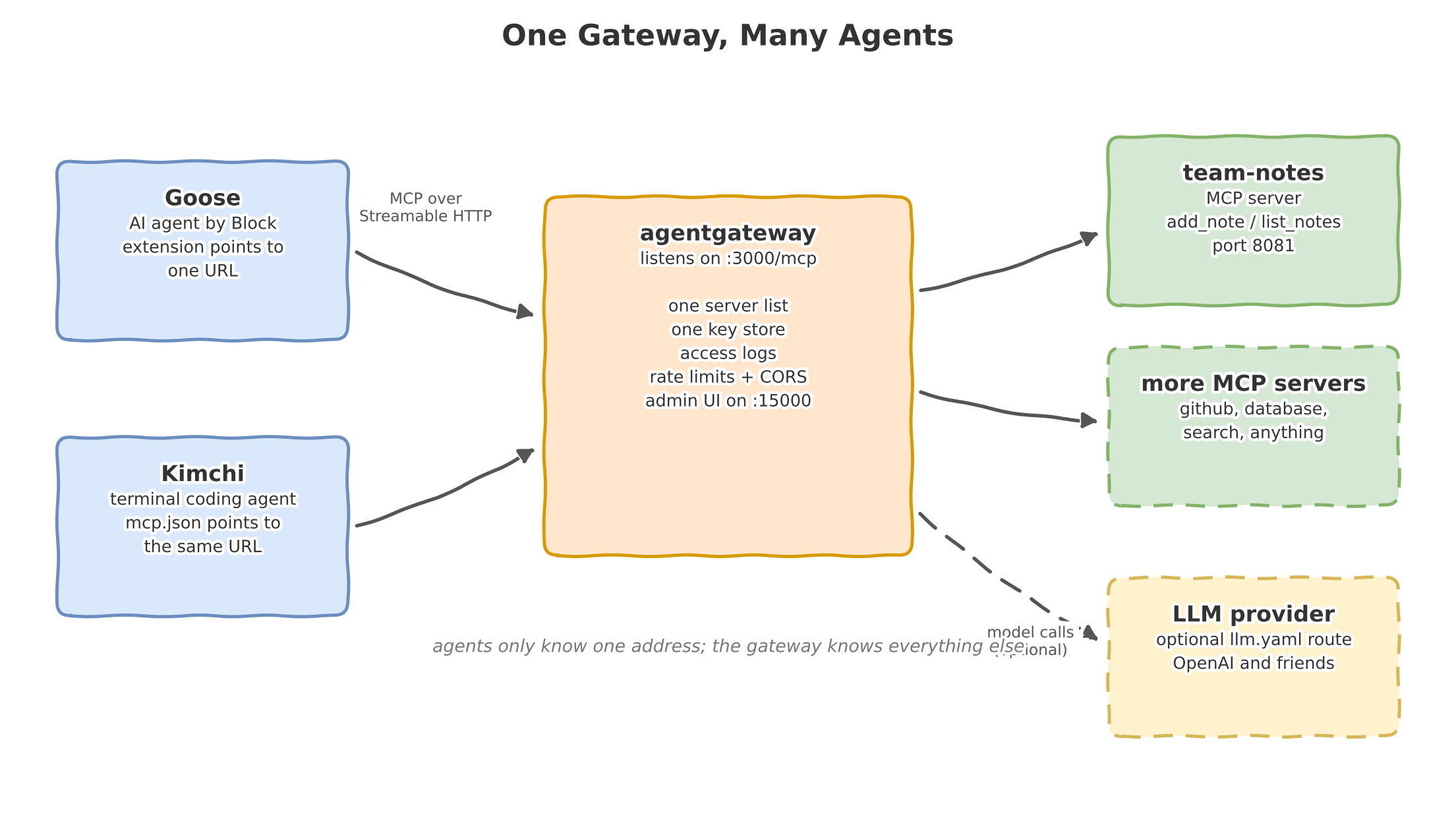
The flow is simple:
- Goose and Kimchi both point at one URL:
http://localhost:3000/mcp - agentgateway accepts the call, applies policies, and writes a log line
- The gateway forwards the call to the right MCP server behind it
- The answer comes back the same way
The agents never learn where the real servers live. We add a server to the gateway config, and every agent sees the new tools on its next session. If we remove one, and every agent loses it at the same moment. So it's a one edit for full fleet.
Example
Consider an repo with following structure:
single-gateway/
├── gateway/config.yaml     # the front door on :3000
├── gateway/llm.yaml        # optional LLM route on :4000
├── mcp-server/             # team-notes, a tiny MCP server in TypeScript
├── agents/goose/           # how to connect Goose
├── agents/kimchi/          # how to connect Kimchi
└── scripts/                # start-all.sh and smoke-test.sh
The demo tool is a shared notepad called team-notes. It has three tools: add_note, list_notes, and clear_notes. Notes go into one JSON file. The point is the story it lets you tell:
Goose writes a note, Kimchi reads it and both calls pass through the gateway, so one log shows both agents by name.
Both agents have one shared memory and one single access door. You can find the repository - https://github.com/Sonichigo/single-gateway.
Build it in four steps
Step 1: Run the tool server
The team-notes server speaks Streamable HTTP, the current MCP transport. this matters because the gateway can only proxy what it can reach over HTTP.
cd mcp-server
npm install && npm run build
node dist/index.js
# team-notes MCP server ready on http://localhost:8081/mcp
Step 2: Run the gateway
The whole gateway config fits on one screen:
binds:
  - port: 3000
    listeners:
      - routes:
          - policies:
              cors:
                allowOrigins: ["*"]
                allowHeaders: [mcp-protocol-version, content-type, cache-control, mcp-session-id]
                exposeHeaders: ["Mcp-Session-Id"]
            backends:
              - mcp:
                  targets:
                    - name: team-notes
                      mcp:
                        host: http://localhost:8081/mcp
agentgateway -f gateway/config.yaml
That is it. Port 3000 is now the front door. The admin UI on http://localhost:15000/ui shows every route and every call.
Step 3: Connect to Goose
goose configure
# Add Extension -> Remote Extension (Streaming HTTP)
# endpoint: http://localhost:3000/mcp
Then in a Goose session:
Use the add_note tool. Author is goose. Text is: deploy plan drafted, please review.
Step 4: Connect to Kimchi
Kimchi reads ~/.config/kimchi/sonichigo-harness/mcp.json, the same shape Claude Code uses:
{
  "mcpServers": {
    "team-tools": {
      "type": "http",
      "url": "http://localhost:3000/mcp"
    }
  }
}
Then in Kimchi:
Use the list_notes tool and tell me what the team wrote.
Kimchi reads the note Goose left. Check the gateway log and you will see both calls, with the agent, the tool, and the time on each line.
No agents installed yet? The repo has a smoke-test.sh that plays both roles with plain curl. It opens an MCP session through the gateway, writes a note as goose, and reads it back as kimchi. Same chain, zero installs.
So what do we get?
| Question | Before | After |
|---|---|---|
| Where do I add a new MCP server? | In every agent config | In one gateway file |
| Where do the API keys live? | In every agent config | In the gateway only |
| Who called which tool at 2 am? | Nobody knows | One access log has the answer |
| How do I block a risky tool? | Edit N files | One policy, all agents |
| How do I rate limit an agent? | You mostly cannot | Gateway policy |
There is a bonus path in the repo too. Agent Gateway can also front LLM traffic and point Goose's OpenAI provider at the gateway instead of api.openai.com, and the gateway holds the real key, counts the tokens, and logs every model call. The agent config never sees the key at all.
So is there any limit?
A gateway is one more process to run, and one more hop on every call. On a laptop the extra latency is nothing but it also becomes a single point of failure, so we have to treat it like any other piece of infra once we move past a demo. And this setup governs traffic; it does not make a bad tool safe. If an MCP server does risky things, the gateway can log and limit it, not fix it.
Why this matters beyond a localhost?
The two-agent local demo is a small version of a real production question. Companies are now running fleets of agents: code agents in CI, support agents, CD agents, testing agents and such, and each one needs tools, keys, and limits. So without a control point, an agent fleet is just a pile of config files with credentials inside.
The pattern in this repo can scales up cleanly. We have agent gateway runs on Kubernetes with the Gateway API, so the same idea covers a whole cluster - agents on one side, tools and models on the other, one governed door in between.
Start small though. Two agents, one gateway, one shared notepad. Once you see both agents in a single log for the first time, the rest follows on its own.
Credits
- @Tanisha Sharma - DevRel at Bolna.ai
- https://www.youtube.com/watch?v=FUNC3-MxMDQ - Why MCP Servers behave different with Each Clients